 Reading Time: 3 minutes
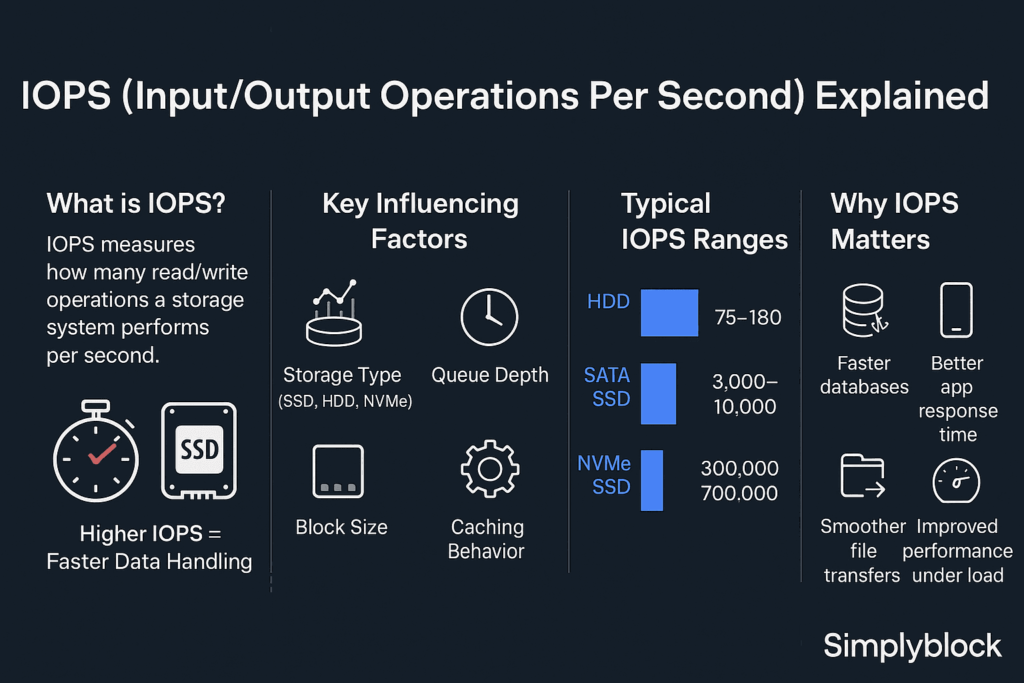
To determine an application’s IOPS (Input/Output Operations Per Second) requirements, you must analyze its workload characteristics—specifically the frequency and size of read/write operations.
1. Use Performance Monitoring Tools
The most accurate method is to measure an existing instance of the application under typical or peak load:
- Windows: Use Performance Monitor (PerfMon) to track the PhysicalDisk \ Disk Transfers/sec counter, which directly represents IOPS.
- Linux: Use iostat (specifically iostat -h or iostat -x). The tps (transactions per second) column corresponds to IOPS.
- Cloud (AWS/Azure): Monitor native metrics like AWS CloudWatch (VolumeReadOps + VolumeWriteOps) over a 2-4 week period to capture real-world demand.
2. Apply Sizing Formulas
If you are designing a new system, you can estimate requirements using these variables:
- The Basic Formula:
- IOPS = Disk Reads/sec + Disk Writes/sec
- Transactional Workload Estimation:
- Total IOPS = TPS (Transactions Per Second)* I/O per Transaction
- Example: 1,000 TPS at 4 I/O operations each = 4,000 IOPS
3. Consider Key Impact Factors
- Block Size: Most benchmarks assume a 4KB block size. Larger block sizes (e.g., 256KB) may count as multiple IOPS in cloud environments like AWS EBS.
- Read/Write Mix: Write-intensive applications (e.g., logging) often require higher performance overhead than read-heavy ones (e.g., web hosting).
- RAID Penalty: If using RAID, you must account for “write amplification.” For example, RAID 10 requires 2 I/Os per write, while RAID 6 requires 6 I/Os
4. Benchmark Against Industry Norms
Common IOPS requirements by workload type:
- Small/Medium Web Hosting: 1,000 – 3,000 IOPS.
- Standard Database (OLTP): 5,000 – 30,000+ IOPS.
- Development Environments: 200 – 2,000 IOPS.
- High-Traffic Enterprise Apps: 15,000+ IOPS.
These guides detail methods for determining application IOPS requirements, including using performance monitoring tools and applying sizing formulas:
- Capacity estimations for Workload IOPS and Throughput … – Server Fault
- AWS IOPS explained: how to scale EBS performance without … – Hykell
- Determine your IOPS and throughput requirements – AWS Documentation – docs.aws.amazon.com
- What are IOPS and why do they matter for VPS performance? – falconcloud.ae
- IOPS basics – Determining IOPS Needs for Oracle Database … – Amazon AWS Documentation
- An explanation of IOPS and latency – HPE Community – Hewlett Packard Enterprise Community
EXAMPLE: To determine the IOPS requirements for a Spring Boot and PostgreSQL application on a specific 24-drive on-prem storage server, you must calculate the Functional IOPS your hardware can provide and compare it against your application’s Real-time workload.
5. Calculate Hardware Capacity (Supply)
Your server’s total IOPS capacity depends on the RAID configuration. Standard 1.92TB 6Gbps Enterprise SSDs typically deliver ~90,000 Read IOPS and ~30,000–38,000 Write IOPS per drive.
- RAID 10 (High Performance): Best for PostgreSQL databases.
- Total Read IOPS: approx 24 * 90,000 = 2.16 Million IOPS
- Total Write IOPS: approx (24 * 35,000) / 2 = 420,000 IOPS (due to 2x write penalty).
- RAID 60 (Capacity/Safety): Higher write penalty (6x).
- Total Write IOPS: approx (24 * 35,000) / 6 = 140,000 IOPS
6. Measure Application Demand (Demand)
Since you are using Java/Spring Boot and PostgreSQL on-prem, use these specific methods to find your actual requirement:
- PostgreSQL Internal Metrics:
- Enable track_io_timing in postgresql.conf to measure how long the OS takes to fulfill I/O requests.
- Check pg_stat_bgwriter to see how many “dirty” buffers are being written to disk during checkpoints.
- Linux OS Level:
- Run iostat -xz 1 while the Spring Boot app is under peak load.
- Look at the r/s (reads per second) and w/s (writes per second) columns. Their sum is your actual IOPS requirement.
- Application-Level Estimation:
- A common rule of thumb for PostgreSQL is that each Insert/Update operation requires approximately 2 IOPS per index (including the Primary Key).
- If a table has 3 indexes, 1,000 inserts/sec will require ~6,000 Write IOPS.
7. Optimize for Java/PostgreSQL
- Checkpoint Tuning: Set checkpoint_completion_target = 0.9 in PostgreSQL to spread out the I/O load over a longer period, preventing IOPS spikes that can cause Spring Boot application timeouts.
- WAL Performance: Since you have 24 drives, consider putting your WAL (Write Ahead Log) on a separate RAID 1 mirror to ensure database commits aren’t delayed by heavy data-file I/O. [9, 10]